
Simple home NAS storage with smart photo tools, easy backups and 4K media playback

Our Verdict

This year I’ve been shocked by the stratospheric rise in my subscription costs, and one of the largest has been the cloud storage. I pay Apple, Google and WeTransfer a sum that is higher than I charge for a day’s shoot across all devices. Ok there’s the convenience, but even then there’s a tipping point where I had to say that another solution was needed.

That solution has arrived in the form of the DH2300, a NAS with personal cloud and media centre features. On paper, this sub-£200 / $200 NAS looks great, but does it really do what it says in the marketing material, and does it suffer the complex set-up that so plagues other devices of this type?

The basic number the DH2300 has to beat is £450 a year, plus online backup and online file transfers; on top of that are the cloud backup, email, and personal accounts. I’ll leave those for the moment as they’ll take a little more thought, but even then the cost of this unit is in line with that price in the first year.

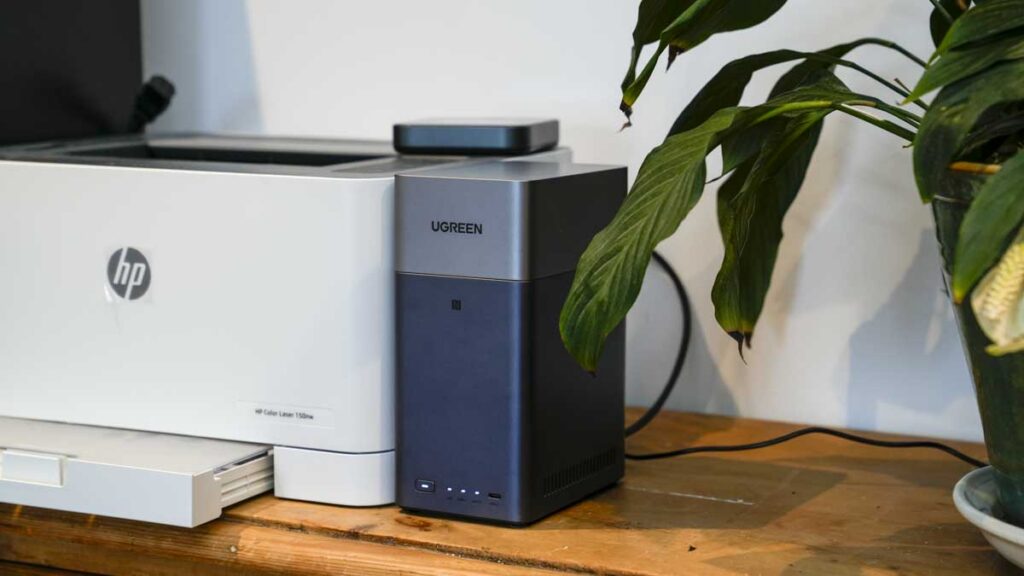
The DH2300 is a slim two-bay NAS built for anyone who wants to back up their files on a home-located, network-attached storage device. The big difference here is that you can do this without learning what a Docker container is, and sure enough, after several weeks with two 2TB drives installed and firmware 1.17.0.0095, the thing that has stayed with me is not the storage- well, 2TB after configuring in RAID 1 is a little small. It’s how good the personal cloud is.

Setting up remote access and sharing folders with people outside my network was easier here than on most other NAS systems I have used, essentially in line with the UGREEN DXP4800 Plus that I reviewed recently, and that includes systems costing several times as much. Add in the genuinely useful APPS such as Photos, Theatre, and Music, 4K HDMI out, and power consumption of 13.72W in use; I’ve had this hooked up to a UPS and Solar, and this works as an office file store, a studio archive and a media server at the same time.

The limitation is the network port. A single 1GbE connection caps transfers at around 109MB/s no matter what you put behind it, so this isn’t a working drive for video editing. For archiving images, backing up cards and running a household photo library, it’s more than enough. If you need speed over the network, spend more and look at UGREEN’s own DXP4800 Plus.

Who it’s for: photographers archiving image libraries and backing up cards, families wanting automatic phone photo backup, and small offices and studios that want a personal cloud rather than another annual subscription.

What is the UGREEN NASync DH2300?

The DH3200 is an entry-level two-bay NAS running UGREEN’s own UGOS Pro, built around a Rockchip eight-core ARM processor at 2.2GHz with 4GB of LPDDR4X and 32GB of eMMC for the system. It takes two SATA drives in either 3.5in or 2.5in form, up to 32TB each for a maximum of 64TB, and has a 1GbE network port, three USB 3.2 Gen 1 ports and an HDMI output that will drive a 4K display at 60Hz.

What it’s not is an enthusiast machine. There is no Docker, no virtual machine support and no internal M.2 NVMe. UGREEN has drawn the line deliberately: this is aimed at someone setting up their first NAS who wants photo backup, file sharing and a media server, and who would like all three to work without a weekend of reading forums.
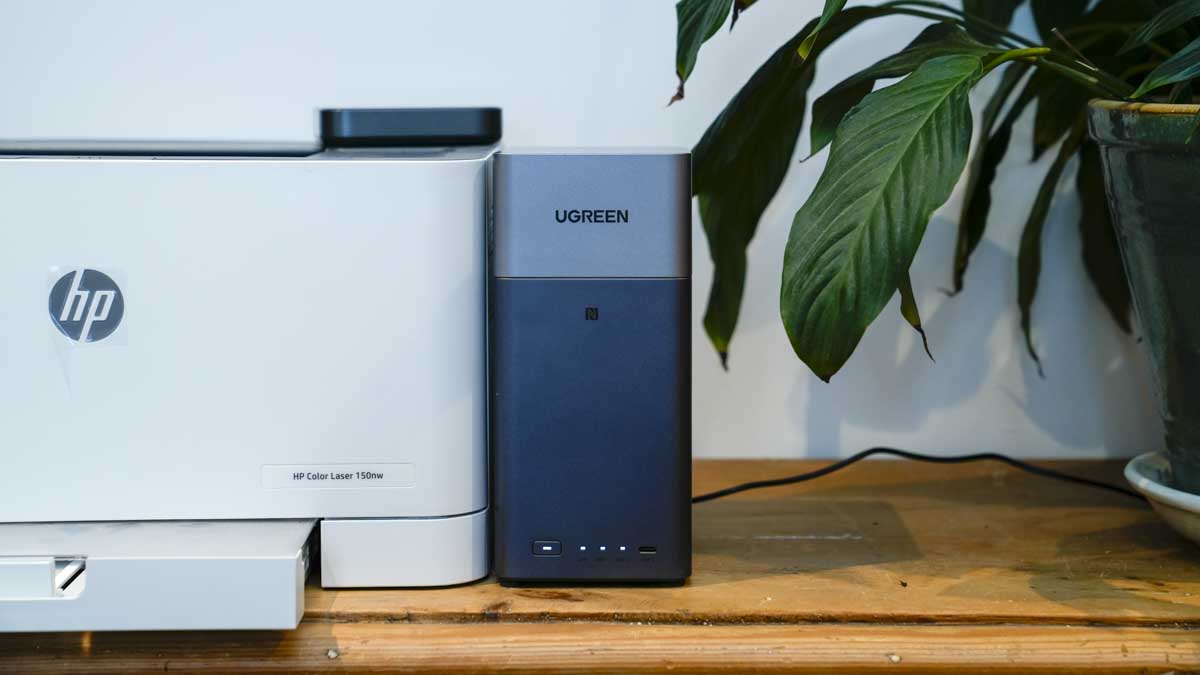
Two accessories are worth knowing about at the point of purchase, because both address genuine weaknesses. UGREEN sells a UPS that sits between the NAS and the mains, bundled with the DH2300 for £255.99 against £176.99 for the NAS alone, so around £79 for the UPS. If you are anywhere prone to power cuts, that is money well spent, because an abrupt disconnection on a live array is how data gets lost. There is also an M.2 NVMe SSD enclosure bundle at £186.99, roughly £10 over the bare NAS. Note that this is an external USB enclosure rather than an internal upgrade; the DH2300 itself still has no NVMe slots.
UGREEN NASync DH2300 Review

Specification

Model: UGREEN NASync DH2300
Type: Two-bay desktop NAS
Drive bays: 2x SATA, 3.5 in or 2.5 in
CPU: Rockchip A72+A53 eight-core, 2.2GHz
NPU: 6 TOPS claimed, used for AI photo recognition
RAM: 4GB LPDDR4X
System storage: 32GB eMMC
Maximum capacity: 64TB with two 32TB drives
RAID modes: Basic, JBOD, RAID 0, RAID 1
File systems: EXT4 and Btrfs, with Btrfs adding snapshot support
Networking: 1x 1GbE
USB: 1x USB-C 3.2 Gen 1 (5Gbps), 2x USB-A 3.2 Gen 1 (5Gbps)
Video out: HDMI 4K 60Hz
Operating system: UGOS Pro
Firmware tested: 1.17.0.0095
Dimensions: 151 x 98 x 213.7mm
Power, drive access: 13.72W
Power, hibernation: 3.304W
Drives: Not included
Price: £176.99 direct from UGREEN, reduced from £219.99; £176.90 to £190 from UK retailers
Bundles: With UPS £255.99; with M.2 NVMe SSD enclosure £186.99
Measured, wired: Read 109MB/s, write 103MB/s (AJA System Test Lite, EXT4)
Measured, Wi-Fi: Read 61MB/s, write 46MB/s (AJA System Test Lite, Btrfs)

Build and Handling
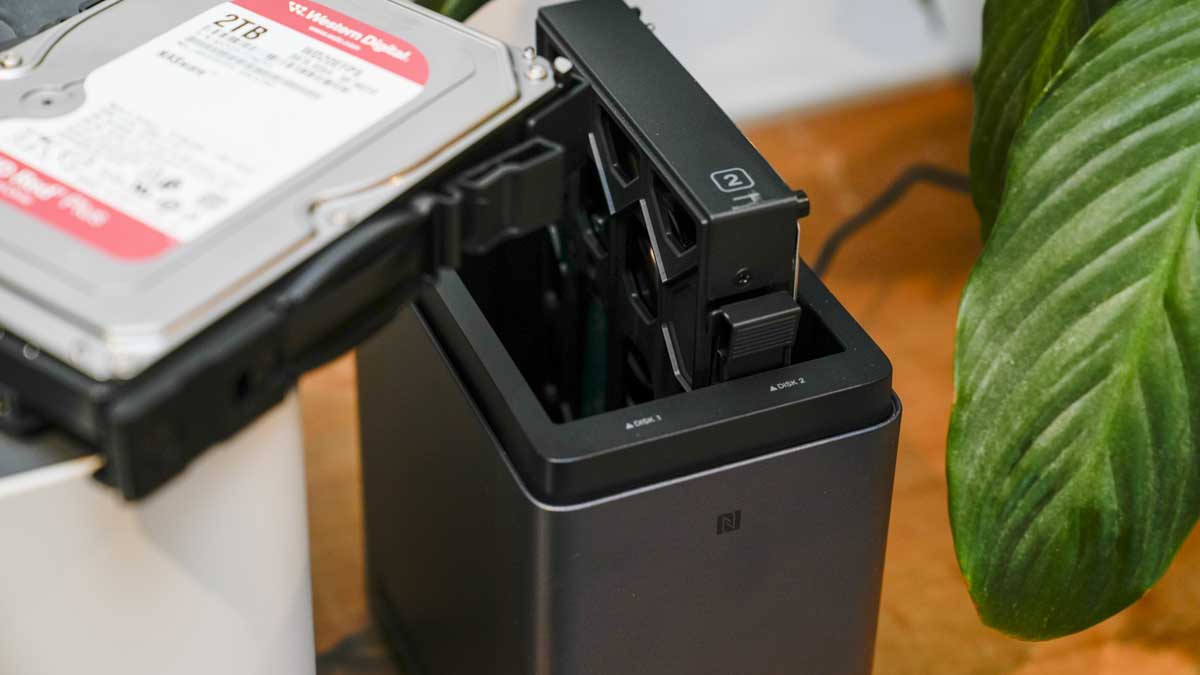
The DH23000 is a small, vertical, and, to be frank, unobtrusive NAS that sits neatly on a shelf with a small 151 x 98mm footprint and height of 213.7mm. The DH2300 is equally suited to stand beside a monitor without dominating the desk, and its plain design suits a machine meant to be forgotten once it is working, which for me means sticking it on top of the cupboard out of the way.
The two drive caddies pull out from the top; a cover holds them in place with magnets. Once removed, you can pull the caddies free, and each will place; they take either 3.5 in or 2.5 in drives. This is the one part of the setup that isn’t tool-free. Each drive needs four small screws into the caddy, and they need to be done properly; a drive that isn’t seated squarely will give you trouble later. UGREEN even includes a small screwdriver in the box, so it’s not exactly time-consuming to screw them into place, but it’s worth knowing before you open the box expecting the tool-free trays some rivals offer.
UGREEN NASync DH2300 Review
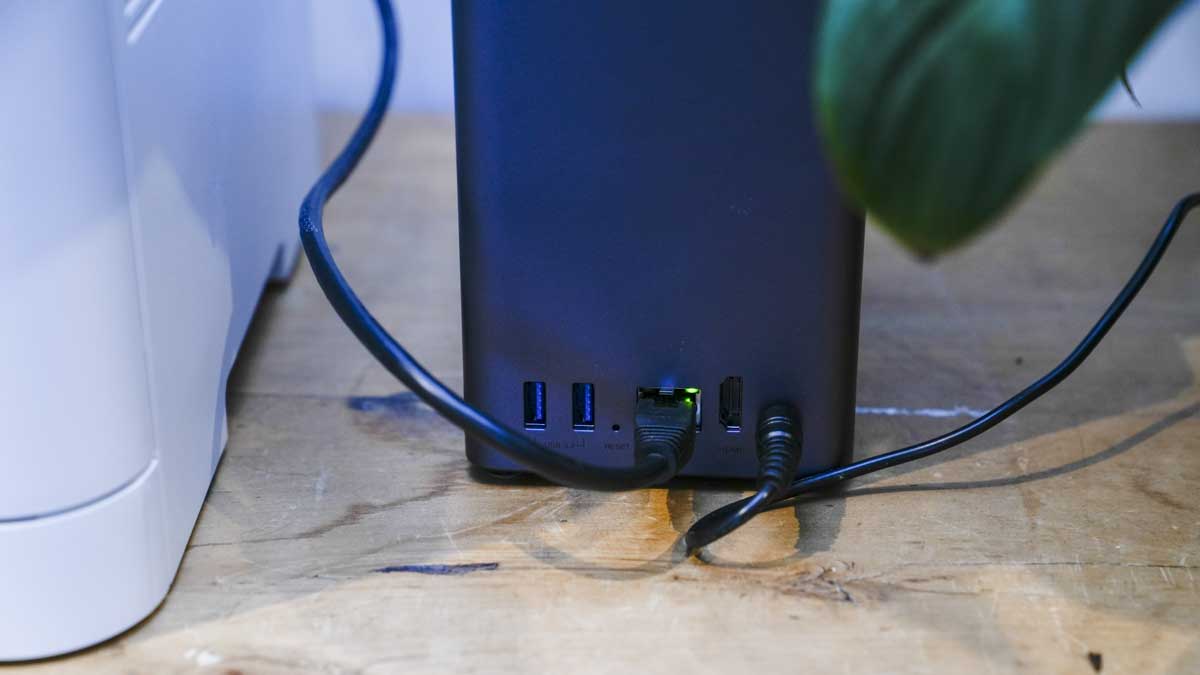
After that, run a network cable to the back and into a switch or router, then power it up. That is the whole physical installation.
Cooling is quiet. Sitting on the desk beside me through several weeks of testing, it never became something I noticed, which for a device meant to run permanently is exactly what you want.

Features

UGOS Pro

Initial setup was fast over the wired network, and UGOS is developing into a solid operating system for everyone, not just people who already understand NAS terminology. It gets you into using the thing without needing any technical knowledge, which, given the audience and the entry-level pitching, is exactly what’s needed.

The personal cloud, and how to set it up

This is the part of the DH2300 that surprised me, and it’s the reason to buy one. Sharing folders with people outside my own network worked exceptionally well and was far easier to understand than many of the NAS share systems I have used in the past. To be honest, it’s the DXP4800 Plus which is exceptional for this use.

Locally on the MacBook Pro, I enabled SMB in the settings and turned on sharing, which sets up the personal cloud. Then go to Control Panel > Device Connection > Remote Access, and finally UGREEN Remote Access, where you fill in your details. One point worth knowing if you are reading this outside China: you will need to register with an email address. Inside China, you can also use a phone number.
Setting up another person is just as straightforward. You create the user, and a personal folder is created for them with a capacity you can set. Save, send them the details, and they access the folder through a unique share link. That’s it.
UGREEN NASync DH2300 Review
It is worth pausing on what that replaces. A folder you can share with a client, a family member or a colleague, with a capacity limit you control, hosted on hardware you own, with no monthly fee attached to it.

Photos, Theatre and Music

The bundled apps all worked well on the live network and later on the isolated internal one, and together they make this small box a very effective media hub for any office or a studio. I’m actually starting to transfer my old analogue music library onto the NAS to remove the need for music subscriptions. Actually, mixing radio with searching for the tracks I want has really helped stop the passive music listening I’ve been prone to for several years. Latest on the playlist is Graham Coxon’s excellent Castle Park and the rediscovery of Mega City Four’s Soulcscraper.

The photo tool app is also impressive and again carries the AI features UGREEN leads on: face grouping, location and object sorting, OCR search, timelines, and duplicate handling, and they do work.

If this could also do video and audio transcription, it would be a very powerful solution.

UGREEN quotes a 6 TOPS NPU for that photo recognition. I’ll discuss TOPS in a feature soon. Still, it’s essentially a theoretical peak rather than measured throughput, and it tells you very little about how fast your library will actually index. What matters in practice is that indexing happens in the background, and the results are searchable afterwards, which they were.

Storage, RAID and file systems

RAID options run from Basic to JBOD, RAID 0, and RAID 1. I began with EXT4 for speed and robustness, with the idea of using the NAS as a working drive over the wired network. Later in the test, I reformatted to Btrfs, which brings snapshotting, and enabled the drive health check to help prolong the life of the drives.
Security is better covered than the price suggests, with two-factor authentication, user permission controls, file version history and snapshots on Btrfs.

Performance

Getting started with the UGREEN DH2300 is fast: once the drives are installed, power and network are connected, and you load the UGREEN desktop app, you can dive into the options and settings. The first step is to create a pool and then the storage for the drive. This is where things usually get complicated, but here UGREEN has focused on making the journey through the options as simple as possible.
I initially selected the two drives, chose the EXT4 format, and created the pool. I then created the personal storage and activated SMB, just for convenience.
You can do everything through the App, or if you’re used to using SMB or similar, then you can go that route as well. Because I wanted to test the speed with benchmark software, I mounted the drive.

Wired speed, and what the 1GbE port really costs you

I put the DH2300 on the 10GbE network first, which was overkill for a NAS with a single gigabit port, but it meant nothing upstream was limiting the result. Measured with AJA System Test Lite on EXT4, the DH2300 returned:
Read: 109MB/s
Write: 103MB/s
Those numbers are better than they look. A 1GbE connection carries 1,000 megabits per second, which is 125MB/s before any protocol overhead, and UGREEN quotes up to 125MB/s accordingly. Measuring 109MB/s read is 87% of that theoretical ceiling, and 103MB/s write is 82%. After TCP and SMB overhead, there is very little left on the table; the drives are not the limit, and neither is the processor. Really, it’s the port, which is why I’ve just spent a fortune upgrading the network to a speed-busting 10GbE.
So the number to plan around, if you’re interested in those transfer rates, is a little over 100MB/s, and what that means depends entirely on what you are moving. For video editing over the network, it’s not enough, and I would not try to work from this drive. For an image library, it’s more than enough, and for overnight archiving it’s irrelevant how fast it is.

Over Wi-Fi

At the end of the test, I moved the DH2300 onto the isolated internal network, by which point it was formatted to Btrfs with the drive health check running. I also enabled the drive health check, another feature I like to have activated, but it will also slow the transfer. Measured over Wi-Fi:
Read: 61MB/s
Write: 46MB/s
That is slower; however, it’s still perfectly usable. But this is a Wi-Fi result, not a Btrfs result. Moving to Btrfs and enabling the drive health check does carry a performance cost, and separating that cost from the wireless link would need the same test run wired on Btrfs. What I can say is that at 61MB/s read, the NAS remained comfortable for everything I asked of it away from the desk, including streaming music and backing up files.

In the studio and the office

Once the speed testing was done, ordinary use is where this box will really be tested in the long term. Setup and day-to-day operation are straightforward; the apps are great if you’re just starting, and as a lightweight, compact network storage option, it proved extremely good, particularly for the price.
In the office, it works well for storing files with fast access and the ability to share out through the personal cloud. In the studio, it’s a good archive for images and video; the 1GbE port is slow for a working drive, but for archiving it doesn’t matter. For backing up images, it’s especially good.

The capacity problem and the drive maths

Here are a few other notes about the drive, especially if you’re a photographer, which is probably why you’re here. When it comes to the storage, this needs careful consideration. With two 2TB drives in RAID 1, you have 2TB of usable space, because RAID 1 mirrors rather than adds. My Lexar CFexpress card is 2TB on its own, so after one long shoot there is no headroom at all. Two 2TB drives are not a sensible configuration for anyone shooting seriously.
The arithmetic is worth doing properly, because it produces a surprising answer. The NAS is around £177. Two 2TB IronWolf drives are about £140 each, so £457 all in for 2TB usable. But 4TB drives currently sit around £124 each, less than the 2TB, which is £425 all in for 4TB usable. The cheaper configuration gives you double the space. If you are buying drives for this NAS, do not buy 2TB ones.
Step up to 8TB drives at around £296 each and the total is roughly £769 for 8TB usable, which works out at about £96 per usable terabyte against £228 for the 2TB configuration. That is my own preference for a NAS of this type; it looks expensive next to the price of the box, and it is the configuration that actually makes sense.
And for video, the capacity max is huge. Two 32TB drives take this to 64TB, which is considerable potential for an archive machine costing under £200 / $200, that is of course without the drives.

Final Thoughts

When you start to weigh up what this NAS offers, the easy setup, the apps that install and work, the personal cloud, it all starts to make sense as a package rather than as a specification sheet.
Even if you use it for nothing but personal cloud storage, the sums work out. After the initial outlay on the hardware and the drives, everything after that is free apart from the electricity, and at 13.72W during drive access and 3.304W in hibernation, there is not much of that either.
Set that against my own cloud storage renewal, now ended, at £450 a year with limitations attached. A DH2300 with two 4TB drives comes to around £425, which means the system pays for itself in under two years, and after that, if I am organised, the savings go towards larger drives.
As a home or small office NAS, the DH2300 is a superb choice. It is a good media entertainment server that multiple people can reach across the network, a sound office file store with genuinely easy sharing, and a capable studio archive as long as you are archiving to it rather than working from it. The single gigabit port defines its limits, and for the audience UGREEN is aiming at, it’s the right compromise at this price.

Should you buy the UGREEN NASync DH2300?

Buy it if you want to stop paying a storage subscription and start owning your files, and if you use it for archiving, backup, sharing, and streaming rather than editing. At around £177 for the enclosure, it is remarkable value; the personal cloud is the best implementation of the idea I have used at this level, and the running costs are close to nothing.
Look elsewhere if you need network speed. A single 1GbE port caps you at a little over 100MB/s, and no amount of drive or network upgrading downstream will change it. If you want to edit video over the network, or you want Docker, virtual machines or internal NVMe, UGREEN’s own DXP2800 is the machine to look at instead.
And budget for drives properly. The enclosure is the cheap part.

How we tested

I tested the UGREEN NASync DH2300 over a two week period with two 2TB drives installed, on firmware 1.17.0.0095. Testing covered drive installation, initial setup and UGOS Pro configuration; transfer speeds measured with AJA System Test Lite over both a wired 10GbE network and Wi-Fi; the Photos, Theatre, and Music apps; personal cloud and remote access setup with an external user; and operation on both a live network and an isolated internal one. The NAS was formatted first to EXT4 and later to Btrfs.

UGREEN NASync DH2300 FAQs

Do you ship internationally?

Yes, we are pleased to confirm that we offer worldwide shipping! Please note that we are unable to deliver to some countries and we apologize for any inconvenience caused.

Where do you ship from?

We ship all of our orders from the Netherlands, where our warehouse is based.

Can I return an item free of charge?

We offer a refund on any items returned to us within 14 days of the delivery date, excluding any delivery costs. To request a return, go to Order Management.