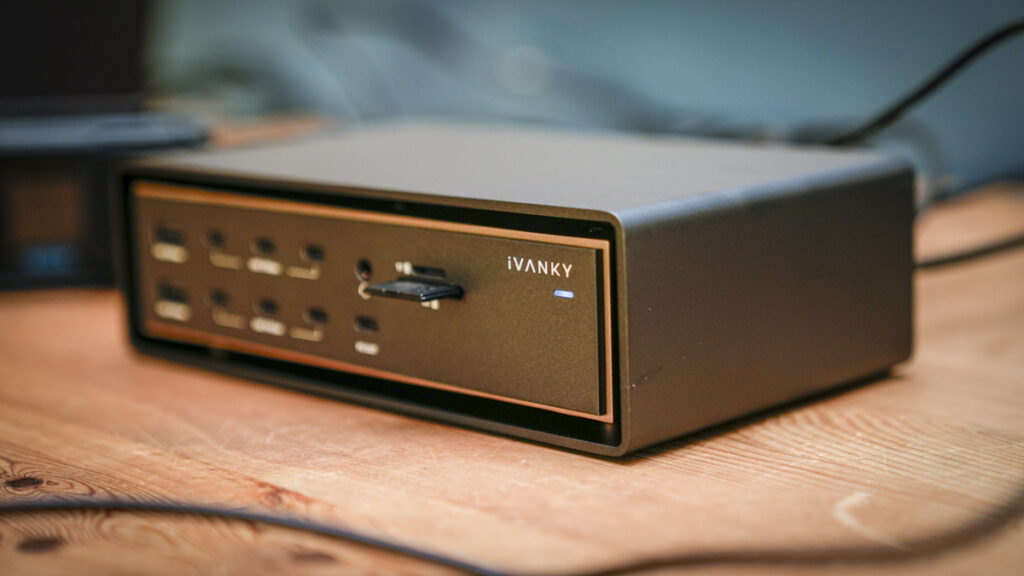

The iVANKY FusionDock Ultra is a Thunderbolt 5 dock for serious Apple Silicon workstations.
Our Verdict
Over the last few years, I’ve watched docks slowly creep up in both port count and price, quite spectacularly in fact, but the iVANKY FusionDock Ultra takes things to another level entirely. Twenty-six ports, four-display support, 10GbE networking, which is good because I’ve just upgraded my network at great expense, and 140W charging back to the Mac, all running through a dual-cable connection that takes up two Thunderbolt ports, which is a bit of a shocker at first. This isn’t a dock for tidying up a laptop-and-monitor setup; it’s the central hub for a serious creative workstation.
During the test, connected to my MacBook Pro M1 Max, it did exactly what I hoped: ran displays, external SSD drives, card readers, the network, and charging all at once without any sign of slowdown or imploding under the strain. It does run warm, but so do I in this heat, and the fans can be heard when things get busy, and the price will rule it out for most people. Honestly, this is desirable, but you really need it at the price, and after two months of testing, it’s gone from nice to an absolute necessity. If you need this many connections, and I, as it turns out, seem to, there’s very little else out there that does what this does from a single unit.
What is the iVANKY FusionDock Ultra?
The FusionDock Ultra is a Thunderbolt 5-class docking station designed exclusively for Apple Silicon Macs, and I do mean exclusively; there’s no Windows, Chromebook or Intel Mac support here at all, which is unusual but does at least mean the whole product is built around what modern Macs can actually do. It requires macOS 15.1 or later, and display capabilities vary depending on your Mac’s chip.
Check out the iVanky FusionDock Ultra at the official ivanky website
The headline is the dual-chip architecture. Inside are effectively two dock controllers, fed by two USB-C connections to your Mac via a clever magnetic dual cable; clipped together for a MacBook Pro, where the ports sit side by side, or split apart for a Mac Studio or Mac mini, where they don’t. That dual connection enables up to 120 Gbps of bandwidth and, on Max-chip Macs, up to four native 6K displays without DisplayLink or any driver workarounds.
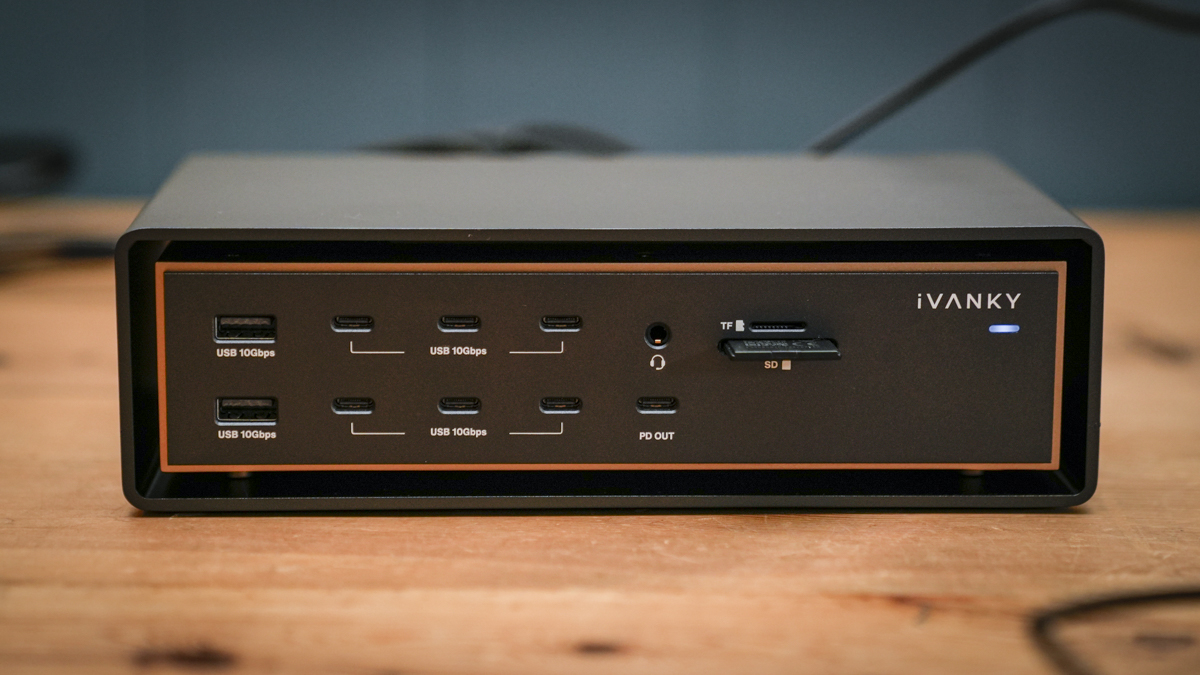
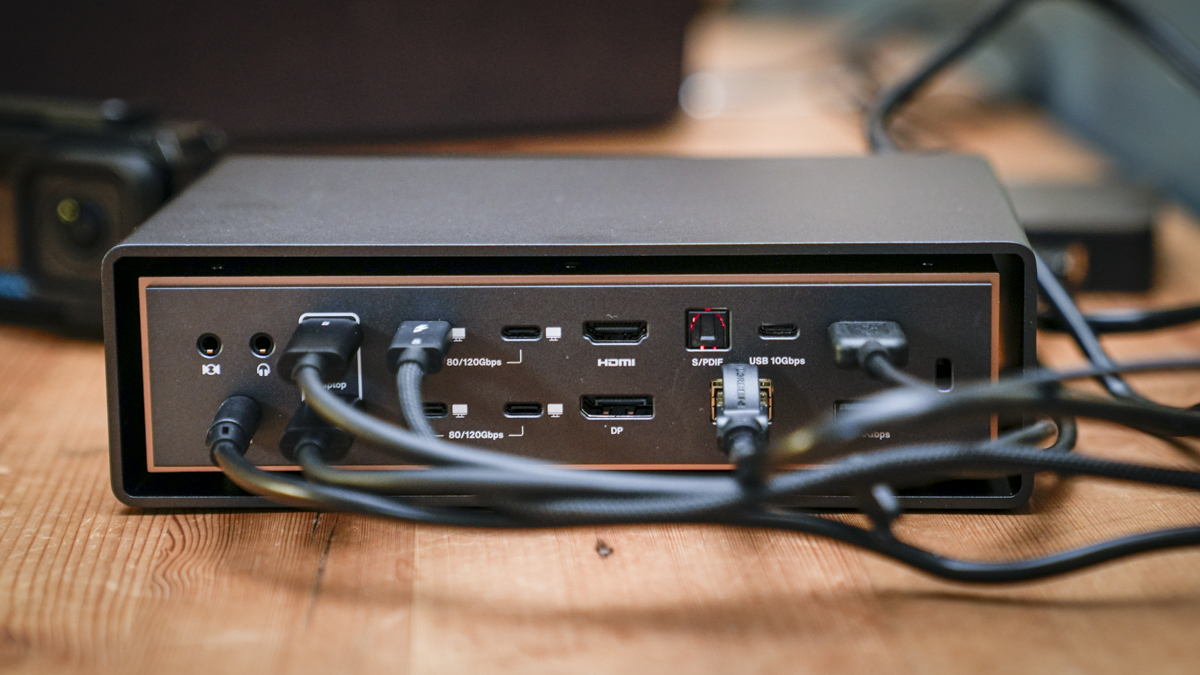
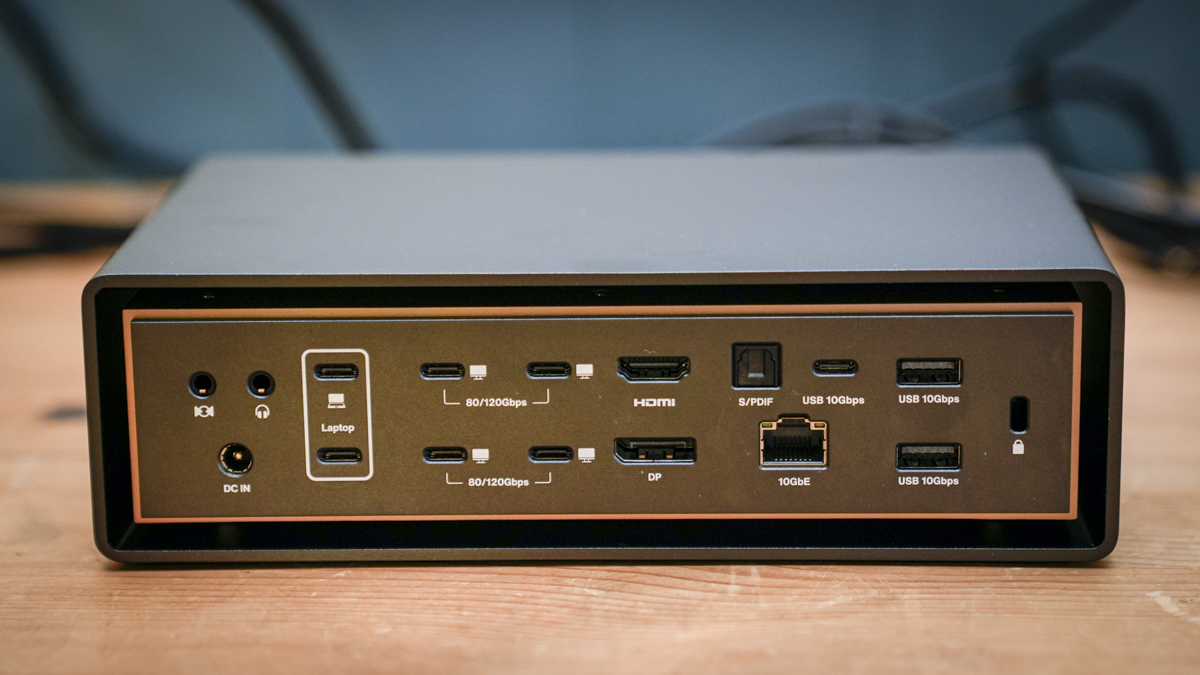
Then there’s the port count: 26 in total, including four high-bandwidth 80/120Gbps USB-C downstream ports, seven more 10Gbps USB-C ports, four 10Gbps USB-A ports, DisplayPort 2.1, HDMI, UHS-II SD and microSD card readers, optical audio, front and rear 3.5mm audio, and a 10Gb Ethernet port, if you haven’t paid a fortune to upgrade your network to 10Gbs do, it’ll be the best money you’ve ever spent.
This dock aimed squarely at photographers, videographers and creative professionals running dense multi-display, multi-drive desks, and priced accordingly at $649.99, down from the full $749.99 at the time of writing.
Specification
Host connection: 2 x USB-C (80/120Gbps), magnetic dual cable
Downstream: 4 x USB-C 80/120Gbps, 1 x USB-C 10Gbps (45W PD), 7 x USB-C 10Gbps, 4 x USB-A 10Gbps
Display: DisplayPort 2.1, HDMI 2.0, plus USB-C display output
Displays supported: up to 4 x 6K 60Hz (Max-chip Macs; varies by chip)
Networking: 10Gb Ethernet
Card readers: SD 4.0 (UHS-II) + microSD 4.0 (UHS-II)
Audio: front 3.5mm in/out, rear 3.5mm in and out, optical Toslink
Power: 140W to host, 45W front USB-C PD, 240W external power adapter
Cooling: passive plates + copper midframe + intelligent dual fans (44-46 dBA at 1cm)
Compatibility: Apple Silicon Macs only, macOS 15.1 or later
In the box: dock, dual USB-C cable (1.2m), Thunderbolt 5 cable (1.2m), power adapter and cord
Warranty: 24 months
Price: $649.99 ($749.99 RRP)
Downstream: 4 x USB-C 80/120Gbps, 1 x USB-C 10Gbps (45W PD), 7 x USB-C 10Gbps, 4 x USB-A 10Gbps
Display: DisplayPort 2.1, HDMI 2.0, plus USB-C display output
Displays supported: up to 4 x 6K 60Hz (Max-chip Macs; varies by chip)
Networking: 10Gb Ethernet
Card readers: SD 4.0 (UHS-II) + microSD 4.0 (UHS-II)
Audio: front 3.5mm in/out, rear 3.5mm in and out, optical Toslink
Power: 140W to host, 45W front USB-C PD, 240W external power adapter
Cooling: passive plates + copper midframe + intelligent dual fans (44-46 dBA at 1cm)
Compatibility: Apple Silicon Macs only, macOS 15.1 or later
In the box: dock, dual USB-C cable (1.2m), Thunderbolt 5 cable (1.2m), power adapter and cord
Warranty: 24 months
Price: $649.99 ($749.99 RRP)
Build and Handling
Out of the box, the FusionDock Ultra is a dock like no other; this is a substantial piece of desktop hardware rather than something you’d slip into a laptop bag. I tried it; it’s heavy, and I probably won’t bother trying again.
The design is quite stunning with a matte aluminium chassis that is extruded as a single rigid piece, and iVANKY makes quite a thing of the 2,000-ton press used to form it. Marketing aside, the result feels impressively solid, with a floating midframe design that lifts the main body to let air move through the chassis, and rubber feet that keep the airflow gap clear.
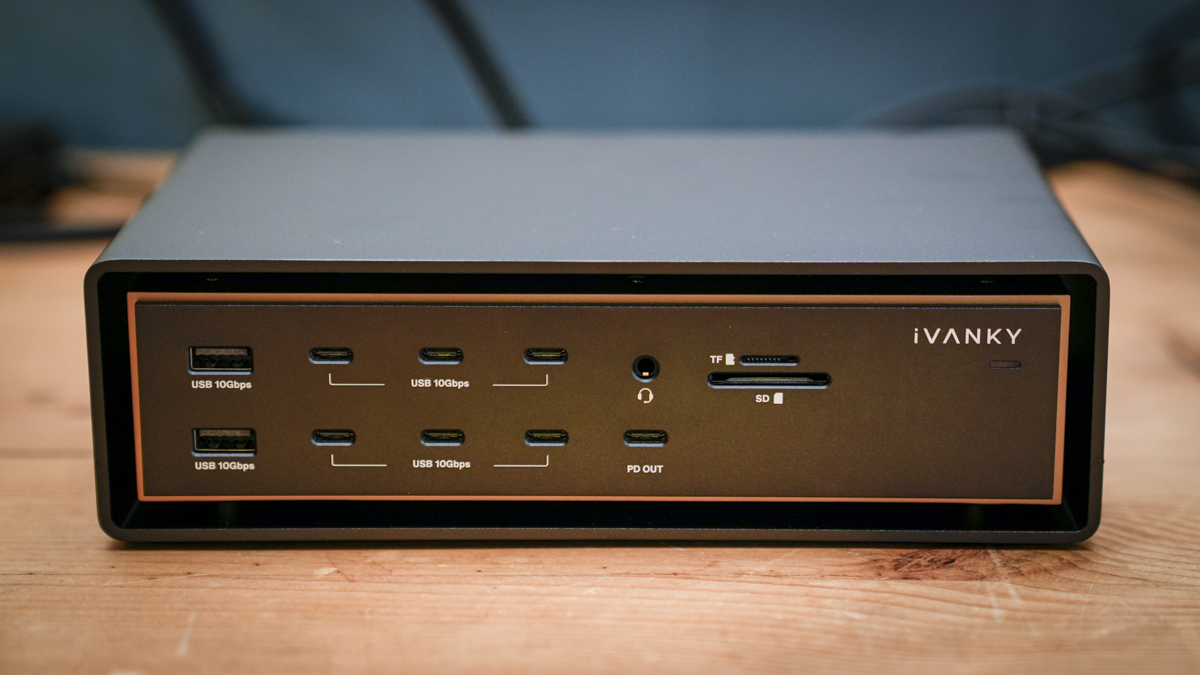
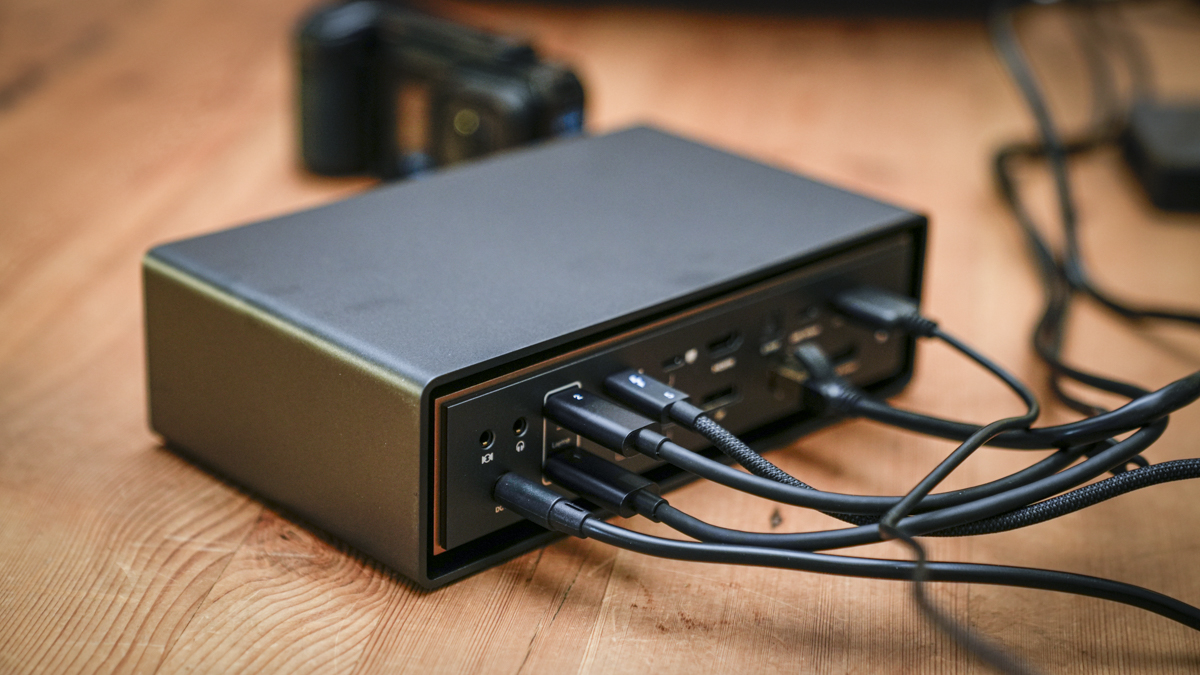
The port layout is well thought out, with the everyday connections, the 45W USB-C charging port, front audio, and the two UHS-II card readers all placed on the front where you actually want them, and everything else neatly labelled on the back. With this many ports, labelling matters more than you’d think, and it’s done well here. What I will say is that with a full set of cables attached, the back becomes quite busy, and some deliberate cable routing is needed to keep the desk looking anything like tidy.
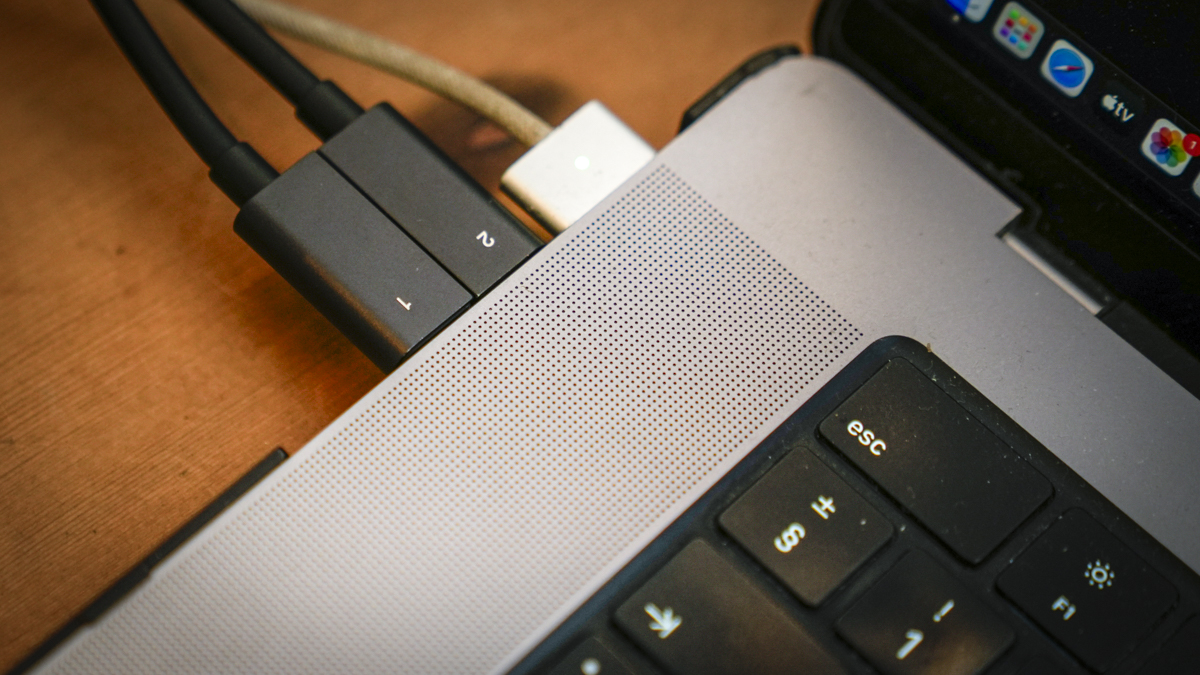
The magnetic dual cable is a genuinely clever bit of design. On the MacBook Pro, the two USB-C connectors click together into a single plug; on a Mac Studio or Mac mini, they pull apart to access ports that are farther apart. It’s simple, it works, and it solves a problem that a fixed dual connector would have created. The catch, of course, is that the dock needs two of your Mac’s Thunderbolt ports, which on a MacBook Pro leaves just one spare, so this dock effectively becomes your machine’s entire I/O.
Power comes from a 240W external brick, which is on the large side and needs a home under or behind the desk. I’d have liked to have seen an integrated supply at this price, and the absence of a front power button means the dock is either on or unplugged. Small things, but at this level, you notice them.
Features
The display support is the feature that will sell this dock to most, and I have a couple of monitors coming in for review that will partner perfectly with this as the heart of the set-up. On compatible Max-chip Macs, it will drive up to four 6K displays at 60Hz natively, with no DisplayLink software, no screen-recording permissions and none of the compromises that software-driven multi-display docks brings.
It’s worth being clear about what that means, though: the dock exposes the outputs, but your Mac’s chip still sets the limits. A base M-series MacBook still only supports one external display, and no dock, this one included, can change that. Before buying, check your exact chip against Apple’s display documentation, because the four-display headline only applies at the top of the range, and while my M1 used to be there, it’s now a few years old.
There are also some fiddly rules around certain 5K monitors; the LG UltraFine 5K and Samsung ViewFinity S9 each consume a full-bus bandwidth, so running two of them requires specific ports on specific rows, and the remaining video outputs on those rows drop to data-only mode. It’s all documented, but as I don’t have those monitors, I skipped the details, made a note and documented here, just so you know if you do have those monitors.
The 10Gb Ethernet port is the feature that most appealed to me, having recently upgraded the studio network to 10GbE for NAS editing. Plugged into the switch and through to the UGREEN NASync DXP4800 GT, the dock’s wired connection kept network editing going at an impressive speed, and if you are working from a NAS, having 10GbE built into the dock rather than hanging off a separate adapter is a proper convenience, and saves a further £80 or so on a USB4-to-10GbE dongle.
The two card readers are both UHS-II, SD and microSD, which, after recently reviewing a hub that dropped to UHS-I on its premium model, is exactly what I want to see. Offloading from the Sony A7 IV’s UHS-II cards ran at the cards’ rated speeds. Add the optical audio out, which reminds me I must get some new headphones, front and rear 3.5mm jacks, and a Kensington lock slot, and there’s very little a creative desk needs that isn’t catered for somewhere on this chassis.
Charging is handled well, with 140W back up the main cable, enough to fast-charge a 16-inch MacBook Pro without its own MagSafe supply, and a dedicated 45W USB-C port on the front for a phone or tablet. The one point to mention is that these are downstream ports: the four high-bandwidth USB-C ports supply 15W each, and the remaining USB-C and USB-A ports just 7.5W. Bus-powered SSDs were fine in the test, but power-hungry drives are worth checking, and anything demanding is best given the 45W port.
Performance
During the test, connected to the MacBook Pro M1 Max, the FusionDock Ultra just worked without a hitch, and that, more than any individual speed figure, is what you’re paying for. With two displays, a pair of SSDs, the card reader, wired network, and a full set of peripherals all running at once, nothing dropped or stuttered, and waking the Mac brought every display and drive back up without the usual hassle of unplugging and replugging that many of the simpler and admittedly cheaper docks put you through.
The M1 Max supports up to three external displays via this dock, and while most of my testing was a two-display setup, I briefly ran a third and everything remained stable. The full quad-display setup needs a Max-chip machine from further up the range. Again, it hits home when a machine that was once at the top now struggles to compete, so I’ll take iVANKY’s stress-testing figures on trust for that one; fourteen storage devices and 24 hours of sustained load is beyond what I was able to throw at it during the test.
File transfers over the high-bandwidth USB-C ports ran at the speeds the connected drives could sustain, and with the dual-cable architecture, there’s enough headroom that moving files while the displays and network are busy doesn’t create the bottlenecks a single-cable dock hits. This is where the two-port connection really comes into play; the bandwidth is simply there when everything demands it at once.
Heat is, as ever, generated as the dock is put under strain. Even with the passive plates, the copper midframe and the dual fans, the chassis runs warm to the touch under load, and during heavier sessions, the fans are audible, quiet, and closer to a gentle hum than a whine, but present. At a normal desk distance, it blends into the background, but if you record audio at your desk, it’s worth knowing. iVANKY themselves point audio professionals towards the fanless FusionDock Max 1 instead, which is an honest approach that I like.
Final Thoughts
The FusionDock Ultra is the most capable dock I’ve had on the desk, and for a certain type of user, it’s close to the complete answer. If you’re running a Max-chip Mac with multiple displays, a NAS over 10GbE, fast storage, card offloads and a desk full of peripherals, this replaces what would otherwise be a dock, a network adapter and a card reader, and does it all with the kind of stability that means you stop thinking about it, which is really the highest compliment a dock can get.
The only thing is you have to be honest about whether you need it. At $649.99, it’s a serious investment; it’s Mac-only; it takes two Thunderbolt ports; and for anyone running a laptop, one screen, and a couple of drives, it is comprehensively overkill; a far simpler and cheaper dock will do that job. The warmth under load and the lack of an integrated power supply are the other small trade-offs.
But if your setup has outgrown every dock you’ve tried, and your Mac’s spec can actually make use of the display support, the FusionDock Ultra is a superb piece of kit, and one that finally treats the dock as the centre of the workstation rather than an accessory. It also looks great on my desk.