
DxO has announced ViewPoint 6, the latest version of its specialist perspective and geometry correction software, introducing AI-powered masking that enables photographers to adjust individual elements within an image without affecting the entire frame. The update also brings direct RAW editing, new exposure and white balance controls, and a fully non-destructive workflow.
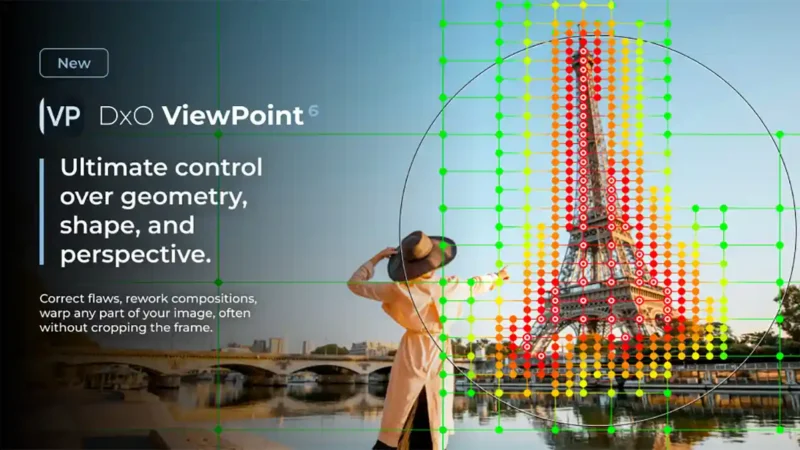
The headline feature is the addition of AI masks to ReShape Fusion, DxO’s existing tool for manipulating the geometry of individual areas of an image. While conventional perspective corrections often require cropping away parts of the photograph, ViewPoint 6 aims to preserve the original composition by concentrating adjustments precisely where they are needed.
For anyone who has photographed architecture with a wide-angle lens, the problem will be familiar. Straightening a leaning building often means losing valuable detail from the edges of the frame. DxO’s new approach allows that building to be corrected independently, reducing the need to sacrifice the surrounding composition.
What makes this particularly interesting is that DxO isn’t using generative AI to reconstruct missing parts of the picture. Instead, ViewPoint 6 works entirely with the pixels captured by the camera, rearranging existing image information rather than inventing new content.
AI masks bring greater precision to ReShape Fusion
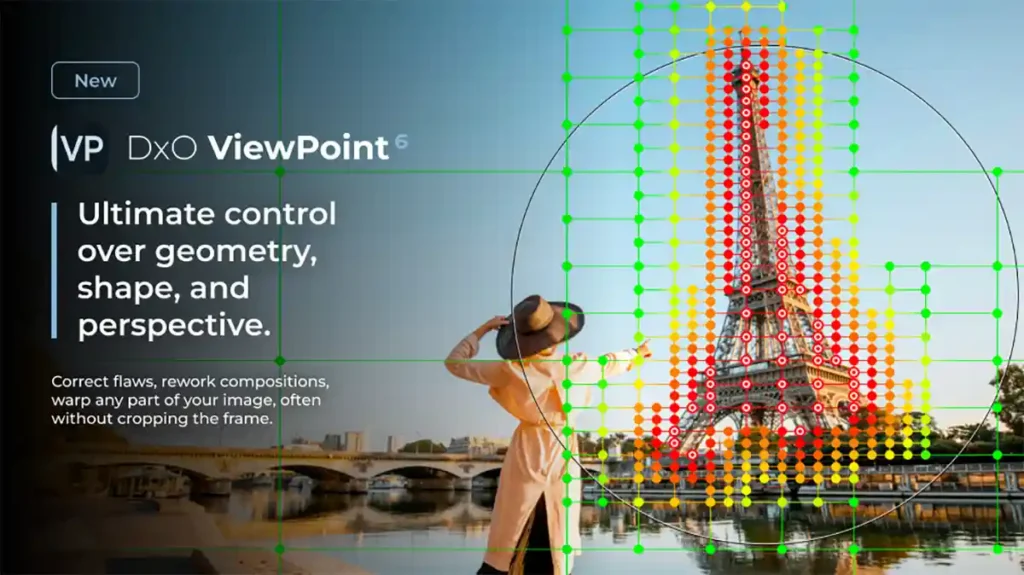
The new masking system builds on ReShape Fusion, which was introduced in ViewPoint 5. Rather than applying a uniform correction mesh across the photograph, photographers can now draw a rectangle around an object and let the software identify its outline automatically.
ViewPoint then creates a mesh that follows the selected subject, placing control points where they’re most useful. The mesh can be more detailed around complex areas while remaining simpler in sections that don’t require adjustment.
Photographers retain manual control over the entire process. Individual mesh regions can be subdivided or merged, control points can be enabled or disabled, and adjustments can be made to determine how far any deformation spreads into neighbouring areas.
This last point is particularly important. Correcting one part of a photograph inevitably influences the pixels immediately around it, so being able to control that transition should help achieve more natural-looking results.
DxO suggests several practical applications, including correcting a leaning building without changing the rest of the composition, resizing objects, and restoring natural proportions to people photographed near the edges of a wide-angle image.
The latter is something I find particularly interesting for event and wedding photography, where people standing at the edges of group photographs can appear unnaturally stretched.
It’s also relevant when working with ultra-wide-angle lenses, such as those discussed in our
Tamron 12-20mm F2.8 announcement, where perspective and edge stretching can become significant considerations.
Perspective correction without losing the original composition
Traditional perspective correction works by transforming the entire image. When converging verticals are straightened, the shape of the photograph changes, typically requiring a crop to produce a rectangular image again.
ViewPoint 6 takes a more selective approach. By isolating an object and reshaping its geometry locally, photographers can retain the original frame dimensions without filling missing areas with AI-generated content.
This doesn’t eliminate every potential compromise involved in perspective correction, but it offers a different way of tackling problems that might otherwise require significant cropping.
The software also retains DxO’s established geometry correction tools.
Automatic lens distortion correction uses DxO Modules, based on laboratory measurements of camera and lens combinations, to correct optical distortion while preserving as much of the original field of view as possible.
Volume Deformation tackles another common wide-angle problem by correcting the unnatural stretching of subjects near the edges of the photograph. Adjustments can be applied horizontally, vertically or in both directions.
Automatic and manual perspective controls remain available for correcting the entire image, while horizon correction and the Miniature Effect provide additional options.
These tools are relevant to far more than architectural photography. Landscape, street, travel, interiors and portrait photographers can all encounter geometric distortion, especially when working with wide-angle optics.
For a more detailed look at how perspective and image structure influence composition, our guide to
using leading lines in photography explains how architectural features and other linear elements can guide the viewer through a scene.
Direct RAW editing and non-destructive corrections
Another significant improvement is the ability to open and edit RAW files directly within the standalone version of ViewPoint 6.
Previously, working with RAW photographs could require preparation in another application. The new version opens RAW files alongside TIFF and JPEG images, allowing photographers to work on geometry without first converting their files.
RAW photographs are rendered using DxO’s own camera profiles in DxO Wide Gamut, with compatible camera and lens information used to apply automatic optical corrections.
DxO has also introduced two additional editing controls.
Exposure Compensation provides adjustments from -4.00 to +4.00 EV and works across supported image formats. White Balance offers presets, temperature and tint adjustments, and a neutral-colour eyedropper for RAW files. JPEG and TIFF images receive a simplified white balance slider and eyedropper.
Importantly, edits are now stored in separate sidecar files alongside the original photographs. This allows users to close the application and return to their work later without losing their corrections or altering their source images.
ViewPoint uses its own sidecar format, separate from DxO PhotoLab’s files, so corrections in the two applications remain independent.
Completed images can be exported as 8-bit or 16-bit TIFF files or as JPEGs.
This moves ViewPoint closer to a self-contained editing application, although its primary purpose remains the correction of geometry rather than comprehensive RAW development.
Works with Lightroom, Photoshop and Capture One
DxO ViewPoint 6 can operate as a standalone application on Windows and macOS, or as a plugin for Adobe Lightroom Classic, Adobe Photoshop and Capture One.
Its tools are also integrated directly into the Geometry palette of DxO PhotoLab 10, giving existing PhotoLab users access to the new correction capabilities within their normal editing workflow.
This integration is particularly interesting given DxO’s recent emphasis on AI-assisted local editing. As we covered in our
DxO PhotoLab 10 announcement, the latest version introduced Depth Masks and expanded AI selection tools.
The two applications approach local adjustments differently, with PhotoLab concentrating on image development and selective tonal changes, while ViewPoint focuses on geometry and spatial relationships.
DxO has also continued to develop its wider editing ecosystem, recently introducing
direct Affinity export in PhotoLab 10.1.
For photographers who already rely on DxO software, the ability to perform sophisticated geometric corrections inside PhotoLab should make ViewPoint 6 particularly convenient.
The addition of AI masks also makes the software more relevant beyond its traditional architectural audience. Rather than simply correcting converging verticals, photographers now have more detailed control over the shapes, positioning and proportions of individual subjects.
I’m especially interested to see how effectively the new mesh system handles complex scenes containing people, fine architectural details and overlapping subjects. The ability to preserve the original framing while making precise corrections is certainly appealing, but the quality of those local transitions will be important in practical use.
DxO ViewPoint 6 specifications
Product type: perspective and geometry correction software.
Operating systems: Windows and macOS.
AI masking: automatic object selection for local geometric corrections.
Reshaping tools: ReShape Fusion with adaptive mesh refinement and propagation controls.
Perspective correction: automatic and manual correction, including local adjustments.
Optical correction: automatic lens distortion correction using DxO Modules.
Volume deformation: horizontal, vertical and combined edge-stretch correction.
Supported input formats: RAW, TIFF and JPEG. Export formats: 8-bit and 16-bit TIFF, and JPEG.
Workflow compatibility: standalone application, Adobe Lightroom Classic, Adobe Photoshop and Capture One plugins, and integration with DxO PhotoLab 10.
DxO ViewPoint 6 price and availability
DxO ViewPoint 6 will be available from 20 October 2026 for Windows and macOS.
The official UK price is £109.99, US price is $129.99 and Euro price is €119.99 for a new licence.
Existing DxO ViewPoint 5 users can upgrade for £69.99, $84.99 or €74.99.
A free 30-day trial is also available.
Please keep an eye on the official DxO website for more details and the DxO ViewPoint download page for the trial version.