
High-bitrate video has a habit of turning what looks like a generous memory card into a storage problem remarkably quickly. GoPro’s MISSION 1 PRO, for example, can record at up to 240Mbps, alongside 8K and Open Gate modes that generate the sort of files you really do not want sitting around on memory cards for long.
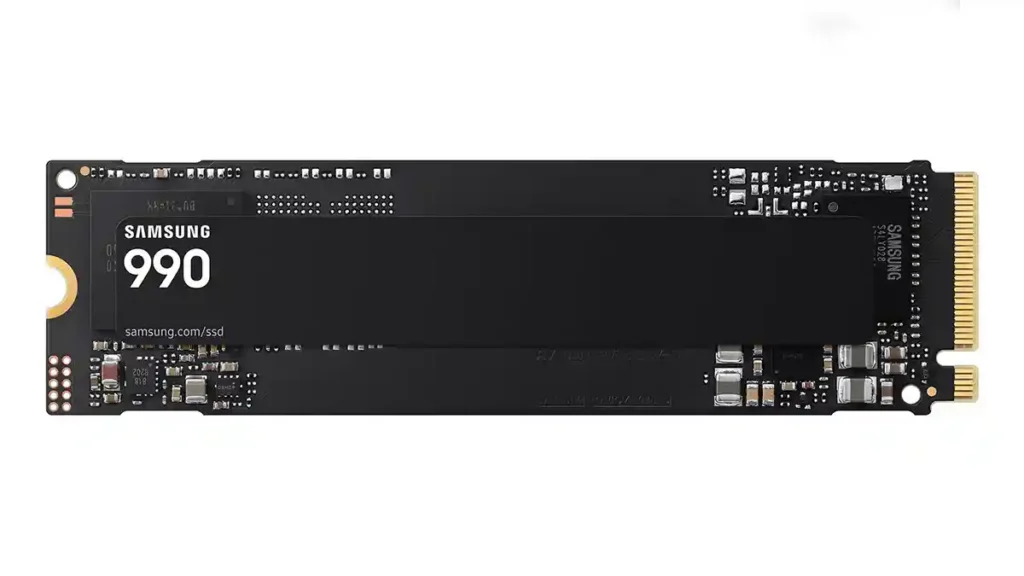
That is where the new Samsung 990 SSD starts to make sense. However, there is an important distinction to make: this is not a ready-made portable SSD. The Samsung 990 is a bare M.2 2280 NVMe SSD designed to slot directly into a compatible M.2 socket inside a desktop, workstation or laptop. Alternatively, you can fit it into a suitable external NVMe enclosure and use it as portable storage. Samsung specifies PCIe 4.0 x4 and NVMe 2.0 connectivity.
That second option is particularly interesting for photographers and filmmakers. I recently tested the TerraMaster D1 SSD enclosure, which accepts PCIe 3.0, 4.0 and 5.0 M.2 2280 NVMe drives. Drop a Samsung 990 into something like that and you have essentially built your own external SSD. The enclosure’s USB 3.2 Gen 2 interface limits transfers to around 1GB/s, so you will not see the Samsung drive’s full internal performance, but that is still ample for field backups and many editing workflows.
The 990 itself comes in 1TB and 2TB capacities. Samsung rates the 1TB model for sequential reads of up to 7,150MB/s, while the 2TB version reaches 7,250MB/s. Both offer sequential writes of up to 6,450MB/s. If it is installed directly into a suitably specified PCIe 4.0 M.2 slot, those figures make it a serious working drive for large photo libraries and video projects.
Why efficiency matters for action camera work
The part that catches my attention is Samsung’s emphasis on efficiency rather than simply chasing another headline speed figure. Samsung claims up to a 38% improvement in performance per watt compared with the 990 PRO, based on its testing of the 2TB models. Average power consumption is rated at 4.3W for reads and 3.8W for writes on the 2TB drive, while the 1TB model is rated at 4.0W and 3.7W respectively.
That matters if you are working from a laptop away from mains power. After a day shooting with the GoPro MISSION 1 PRO, you could be copying hundreds of gigabytes while sitting in a car, tent, café or hotel room. Lower drive power consumption will not suddenly double your laptop battery life, but keeping the storage side of the workflow efficient certainly helps, especially during long transfers. The MISSION 1 PRO’s 8K30 4:3 Open Gate mode is particularly relevant because it gives you the freedom to crop horizontal, vertical and square versions from the same footage later.
The same argument applies if you are still shooting with the GoPro HERO13 Black. Its 5.3K60 and 5.3K 8:7 modes still create substantial amounts of data, although the jump to the MISSION 1 PRO’s 8K and 240Mbps options makes storage capacity an even more obvious consideration.
Where the Samsung 990 sits
The 990 uses Samsung V-NAND, an in-house Samsung controller and Host Memory Buffer rather than a dedicated onboard DRAM cache. That helps explain where it sits in the range. This is not being positioned as the ultimate workstation drive; it is a more accessible PCIe 4.0 option that still delivers extremely high sequential performance.
If I were putting together a machine for sustained professional video editing, I’d still look carefully at the Samsung 990 PRO or, for a PCIe 5.0 workstation, the Samsung 9100 PRO. The 990 PRO also carries a longer five-year warranty, while the standard 990 is covered for three years or 400TBW on the 1TB version and 800TBW on the 2TB model.
For a secondary internal project drive, photo library, fast offload destination or a DIY external SSD, however, the standard 990 looks much easier to understand. Our previous Samsung 990 EVO Plus review also showed how useful these bare M.2 drives can be when paired with the right enclosure.
There is still room for a gentle grumble about Samsung’s naming. We now have the 990 PRO, 990 EVO, 990 EVO Plus and plain 990, so checking the exact model before buying is more important than ever.
We have a review sample on the way, and I will be particularly interested to see how the Samsung 990 performs both inside a computer and inside an external enclosure such as the TerraMaster D1.
Samsung 990 SSD specifications
Product type: PCIe 4.0 NVMe solid-state drive for compatible computers and M.2 NVMe enclosures.
Capacities: 1TB and 2TB.
Interface and form factor: PCIe 4.0 x4, NVMe 2.0, M.2 2280.
Cache design: HMB (Host Memory Buffer).
Sequential performance: up to 7,150MB/s read and 6,450MB/s write for 1TB; up to 7,250MB/s read and 6,450MB/s write for 2TB.
Random performance: up to 700K read / 1,100K write IOPS for 1TB and 850K read / 1,200K write IOPS for 2TB.
Power consumption: average read/write consumption of 4.0W / 3.7W for 1TB and 4.3W / 3.8W for 2TB, with up to 38% better performance per watt than the 990 PRO.
Endurance and warranty: 400TBW for 1TB and 800TBW for 2TB, with a three-year limited warranty or the applicable TBW limit.
Dimensions: maximum 80.15 x 22.15 x 2.38mm.
Weight: maximum 9g.
Samsung 990 SSD price and availability
The official US price is $269.99 for the 1TB Samsung 990 SSD and $529.99 for the 2TB model. Official UK and Euro prices are not currently listed on the official Samsung product pages I could verify. Samsung’s US website currently marks both capacities as out of stock. Please keep an eye on the official Samsung 990 SSD website for more details.