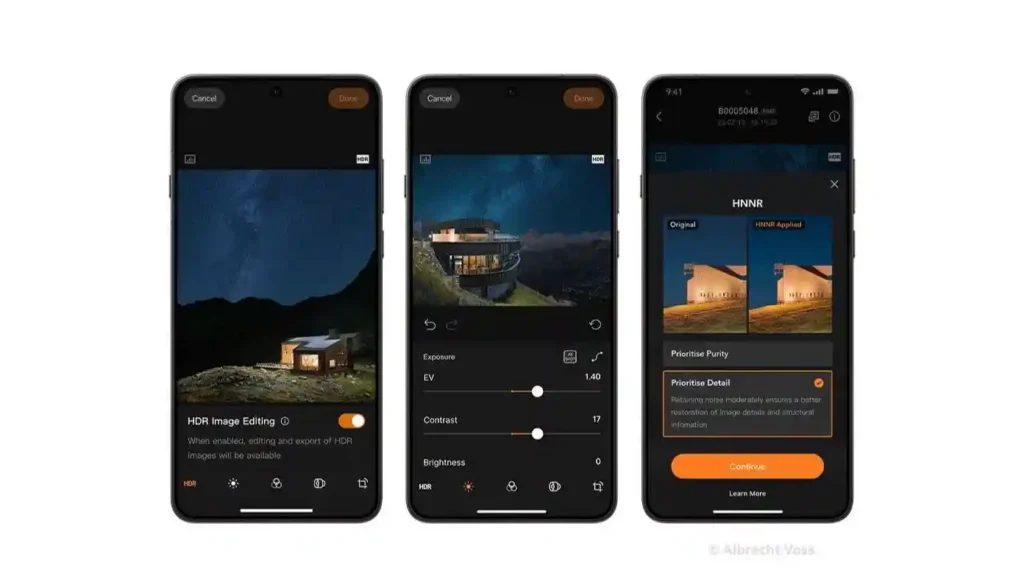

Android users of Hasselblad’s medium format cameras have long watched the mobile side of the workflow from the sidelines, and today that changes. Hasselblad has announced that Phocus Mobile V1.0.0 for Android is now available, supporting the X2D II 100C, X2D 100C and 907X & CFV 100C. It’s a genuinely long-requested release, and it brings the full Hasselblad mobile imaging workflow to a much broader group of photographers. Coming so soon after the arrival of native Hasselblad support in Capture One, it’s clear Hasselblad is intent on making its files easier to work with wherever you happen to be.
At its core, Phocus Mobile for Android delivers the end-to-end Hasselblad Natural Colour Solution (HNCS) experience on a phone or tablet. True-to-life colours, smooth tonal gradation and rich highlight detail are preserved all the way from preview through to final export, so photographers can review and edit away from the desktop without worrying that the mobile version is a watered-down compromise. For anyone who has invested in a Hasselblad precisely for its colour rendering, that fidelity travelling intact to mobile is the whole point.
The standout addition for us is Hasselblad Natural Noise Reduction (HNNR). This AI-powered RAW noise reduction is calibrated specifically for Hasselblad’s medium format sensors and trained on hundreds of thousands of Hasselblad images, cleaning up a 100MP RAW file in roughly 15 to 20 seconds. Two modes are on offer: Purity Mode for the cleanest possible result, and Detail Mode to preserve fine micro-textures. It’s especially welcome on the 907X & CFV 100C, which lacks in-body stabilisation, meaningfully extending what’s possible handheld in low light.
There’s a full editing toolkit too — exposure, curves, white balance, monochrome correction, lens correction, noise reduction, sharpening, cropping, rotation and keystone correction — with edit settings copyable in batches to speed up high-volume work. On supported HDR Android devices, HDR images from the X2D II 100C can be viewed and refined with precise highlight adjustment, and exported as Ultra HDR JPG, while RAW files export as Ultra HDR JPG or HDR TIFF. Images import over Wi-Fi or, on supported cameras, a wired USB-C connection, and can be rated and favourited before export to JPG, TIFF, HEIF or 3FR RAW.
Our one caveat is the hardware bar. This is squarely aimed at recent flagship phones: Phocus Mobile for Android needs at least 12GB of RAM and Android 12 or later, with Hasselblad recommending Android 16 and a Snapdragon 8 Gen 3 or newer chip for the best experience — and HNNR requires Snapdragon 8 Gen 3 at minimum. Plenty of Android owners will qualify, but this is not a release for older or mid-range handsets. That aside, it’s a long-overdue and well-judged step that finally puts Android users on an equal footing.
Hasselblad Phocus Mobile for Android: Specifications
Supported cameras: X2D II 100C, X2D 100C, 907X & CFV 100C. Colour: end-to-end Hasselblad Natural Colour Solution (HNCS). Noise reduction: Hasselblad Natural Noise Reduction (HNNR), AI RAW noise reduction with Purity and Detail modes, roughly 15–20 seconds per 100MP RAW. HDR: viewing, highlight adjustment and export on supported HDR Android devices (X2D II 100C); export as Ultra HDR JPG or HDR TIFF. Editing: exposure, curves, white balance, monochrome correction, lens correction, noise reduction, sharpening, cropping, rotation, keystone correction, plus batch copy of edit settings. Import: Wi-Fi or wired USB-C (supported cameras). Management/export: star ratings and favourites; export to JPG, TIFF, HEIF or 3FR RAW. Requirements: Android 12 or later with at least 12GB RAM; Android 16 and Snapdragon 8 Gen 3 or newer recommended; HNNR requires Snapdragon 8 Gen 3 or later; wired USB-C requires X2D II 100C firmware 1.3.16.1 or later.
Hasselblad Phocus Mobile for Android: Price and availability
Phocus Mobile V1.0.0 for Android is available now as the official companion app for the supported Hasselblad medium format cameras, subject to the device requirements above.